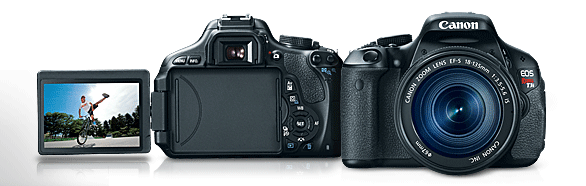
Canon EOS Rebel T4i vs Canon T5i- The Difference

t5i
Canon just launched their EOS rebel T5i (700d), and it has some big differences from their previous rebel models, the T4i (650D) and T3i (600D) that you should know before looking at buying any DSLR.

Sensor Changes: Canon has indicated that minor sensor enhancements have been made, but the resolution of 18 Megapixels that we’ve seen since the T2i has been left untouched on the T5i. Three generations is a long time to not touch resolution, but 18 megapixels is large enough for nearly any purpose, and still leads the lower ends of the market, and the mid range.

Autofocus: Canon has kept the autofocus system largely the same, which is is OK on the T5i because the autofocus was significantly upgraded on the T4i, when they switched all points to crosstype, a faster, more efficient focus.

My chat with the President of Canon

Expanded ISO and low light shooting: This has been a sticking point for me in the past with cheaper DSLRs. They don’t always have very good low light performance which means crazy noise, and that the autofocus doesn’t quite work (it just gives up in dim light). The T4i’s ISO range went up to 6400 with expandability up 12800. The T5i doubled the possible range, with an ISO range up to 12,800, expandable up to 25600. This brings the T5i in line with some of its’ more expensive competitors from Nikon, like their full-frame D600.

I bought a T3i.

Burst Rate: The Rebel line has been known as the lower end of burst rate for a while. The T4I shot at a mere 3.7 FPS at full resolution, which is not fast enough for real sports shooting. Many people have paid up for nicer models based on this alone. The T5i has 5 Frame per second shooting, which is just slightly slower than Canon’s $1000+ bodies. That’s a 35% improvement in speed, and now the Rebel T5i is a much more viable option for consumers who want to get that perfect action shot at their kid’s soccer game.

How to find a DSLR

Weight has stayed fairly consistent on the T5i, with a minor difference from the T4i. Everything else from the T4i is fairly similar on the T5i, including the touch screen controls, manual controls, inputs, and layout. Canon did add a dial for a 360 degree rotation feature, and a few software upgrades, but that’s about it.

So when’s it worth an upgrade? If you’re shooting in low-light, or shooting athletics you’ll notice a significant difference, but elsewhere it’s practically the same camera. Video settings have improved a bit from previous models, but not significantly. Ultimately, if you have a 60D, T3i, or newer there’s no real reason to upgrade yet.

Related Reading:

  1. I bought a T3i.
  2. How to find a DSLR
  3. Traveling with a DSLR
  4. Canon Sx 260 HS Review
facebooktwittergoogle_plusredditpinterestlinkedinmailby feather

How To Make Realistic Ghost Photos With No Special Effects Skills- Tutorial

Who here has watched one of those ghost hunting shows? Come on, and admit it Mr.science. You like watching them flaunt their cool gadgets to prove mythical creatures. And how about those creepy pictures in the dark where they’re walking through furniture? Want to know how to do that? I’ll teach you how to do that with only a camera and yourself. SCARE YOUR FRIENDS.


What You’ll Need:

  • A dark room. Not a photographic “dark room” but rather a room with very little light
  • DSLR, superzoom, or other large sensor digital camera with controllable shutter speed
  • Piece of Furniture
  • Ghostly Costume- because ghosts from the 50s didn’t where Nike t-shirts and jeans
  • Free Photo Editing Software. Even programs like iPhoto will work for this
  • Rudimentary Knowledge of how to operate said camera
  • Flashlight

Top Tip:

To make it extra scary, include a detailed background behind your scene, such as a poster. The poster will be visible through the person, giving them a further ghostly appearance.

Steps to make your ghost photo:

  1. Put on your costume. Be creative. I created a lab setup and put on a lab coat I had from last halloween and a creepy wig.
  2. Set up your camera on a tripod. With long exposures, the worst thing you can do is let your camera shake. If you don’t have a tripod, at least set your camera up on a solid flat surface.
  3. Focus your lens. Autofocus doesn’t work in the dark, so you’ve got to focus manually before you turn out the lights.
  4. Further configure your camera. Automatic ISO is best, and you’re going to want a shutter speed of at least 15 seconds. Most DSLRs max out timed shutters at 30 seconds.
  5. Put your furniture in the shot. Scout out a place where you can quickly hide it.
  6. Turn out the lights. Use your flashlight to navigate and find the shutter. Turn the flashlight out BEFORE you turn on the shutter. For a cool fog effect, leave the door open a crack for a tiny bit of light leak. Be careful not to let too much in though, or it could ruin your image.
  7. Start the shutter. A.K.A Click the photo-taking button on your camera.
  8. Stay out of the shot and count out half of your shutter speed.  For example, if I shoot at 30 second exposure, I’m going to count to 15.
  9. After getting halfway through. Run to where your furniture is, push it out of the view of the camera, and pose for the remaining 12-15 seconds until the shutter closes.
  10. Review your shot to make sure you got it.
  11. Load your shot into your photo editing software.
  12. Increase the brightness just a tad, and crop it to crop out unnecessary areas of the room. Even the automatic optimization tool iPhoto will fix your photo enough in a single click to make it clear and scary.
  13. Share your photo and scare your friends.

How this works.

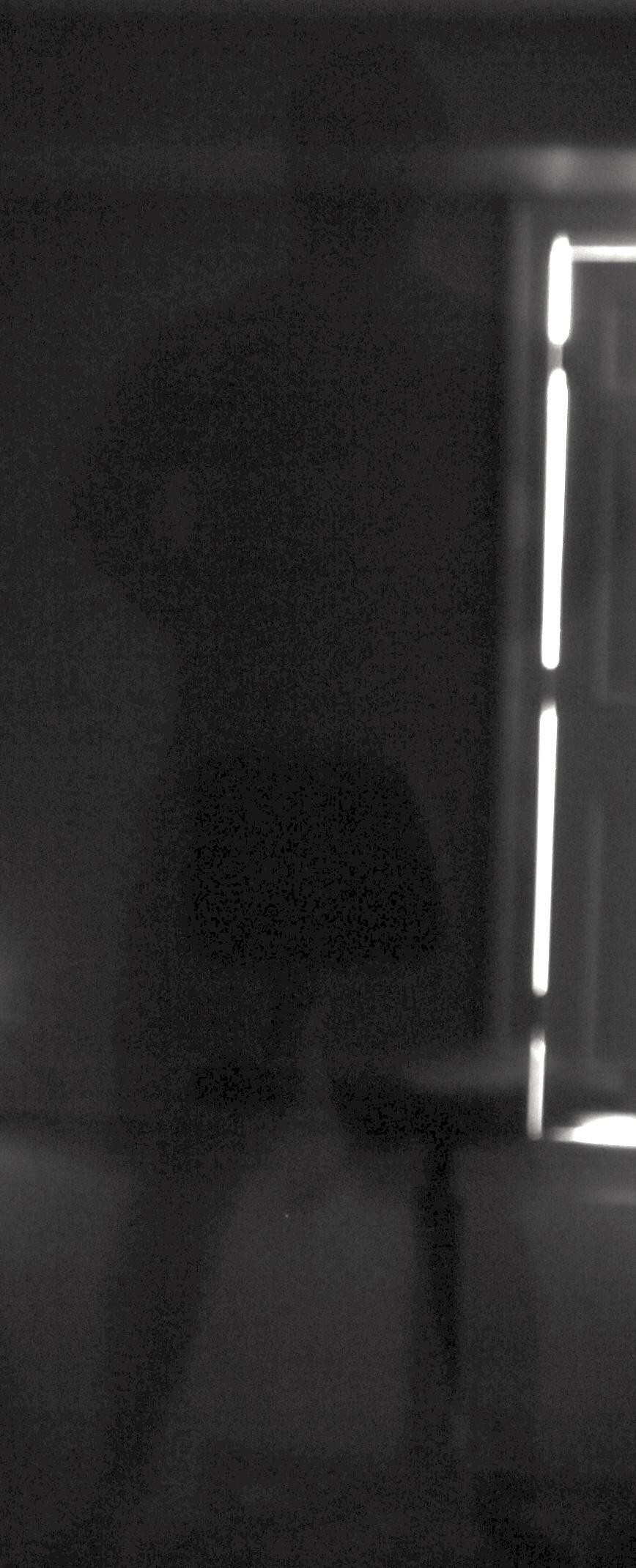
Your camera sees you in its’ sensor for the last 15 seconds, and your furniture for the first 15 seconds. It essentially blends you with the furniture, and fades you naturally based on how long you’re in the photo, while the background is solid. This is similar to the principle behind the blur of fast-moving people in timelapses of streets.

The lack of light does two things: It gives you a darker, ghostlier appearance, and it prevents the image from being overexposed. Remember that ever 1/1000 of a second that your shutter is open, it’s exposed to light, and long shutter speeds without the right equipment in even dim daylight can completely overexpose it, and make it one indistinguishable white blob.

Are you going to give it a try?

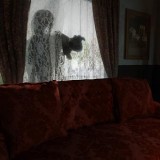
Notice that the shadow is on the chair from both sides, breaking reality

Notice that the shadow is on the chair from both sides, breaking reality

IMG_1220

“Hey Mom, I Can pass through chairs”


facebooktwittergoogle_plusredditpinterestlinkedinmailby feather

We’re Giving Away 5 Free Copies of Photobulk Photo Editor- Who wants ‘Em?

ATTENTION ALL BLOGGERS, PHOTOGRAPHERS, and everyone else… I’ve got some great news. We recently featured Photo bulk photo editor here (full review coming soon), which allows you to easily resize and watermark photos. The developer was so glad that I liked it that he offered me 5 FREE copies to give away! And I’m giving them away here for free.

10 Best Mac Blogging Apps

One of our 10 Favorite Blogging Apps

Entering is easy and free. Here’s how.

You want it? You want the codes for one free download on the mac app store? All you have to do to enter is follow the instructions on the widget below. Simply following us on Twitter, or Facebook will give you a shot at one of 5 codes. Doing both gives you double the shot. Are you ready to get it for free?

Entry Deadline: 2/11/13

a Rafflecopter giveaway

facebooktwittergoogle_plusredditpinterestlinkedinmailby feather

How To Travel With Your DSLR: 5 Tips

DSLRs are popular for their large sensors, interchangable lenses, and full control of image, but it really sucks if you spend $800+ on a great camera and can’t bring it on your vacation to Rome/Kansas/Your sister’s wedding, so I’ll teach you here and now how to travel with a DSLR.

Is travelling with a DSLR possible? Yes. I just took my brand new camera (Canon EOS Rebel T3i) on a 5,000 mile journey to Hawaii. Here’s how.


  1. Find a glove, not a mitten. Translation: Don’t take around a case meant for your camera and your 10 favorite lenses (OK- Don’t call me out. Maybe 5 lenses). DSLRs are bulky enough. Buy a case meant to around your camera, and nothing more, because DSLRs are heavy enough, and carrying a separate case is a pain, so it should fit in your bag. I use an old Tamrac camera-shaped case which perfectly fits one camera, one lens, one spare battery, and doesn’t take up my entire backpack.Tamarac Camera Bag
  2. Don’t bring your band, bring your guitar. Translation: You don’t need a tripod, or 5 lenses, or a lighting setup (I’m not kidding- people have brought them). Think about it. If you spend more than 30 seconds setting something up, you’re going to miss most shots. Plan for shooting on the go (one prime lens, one zoom maybe) and you’ll save time, money, space, and a backache.
  3. “No sir. Hotel safes do not store digital photos”. Never count on the security of your photos, and never count on a single memory card. If you can, transfer your photos to your laptop at the end of each day, and bring a spare memory card just in case. You don’t want to waste your whole card taking pictures of useless art, get to the mona lisa, and find out your only card is full.
  4. “He’s a tourist”. In some places, if you walk around wearing your camera strap you’ll guarantee a mugging or a pick-pocket. Make sure your camera bag is discreet (should be if you followed step 1), and make sure it is securely attached to you so that someone doesn’t swipe your gigabytes of precious memories without you knowing.
  5. Common Sense saves dollars and cents. Don’t put your $800 baby at risk. Make sure your case has proper waterproofing, and avoid taking out your camera while it’s raining (more people do this than you’d think). For additional protection when surprises come,  stick your closed camera bag between your rain jacket and body to keep it especially dry. Moisture and extreme temperatures are also not good, so if it seems really hot/cold/humid PUT THE CAMERA IN THE BAG. It’s not worth the risk. In dusty areas keep it in the bag as much as possible, do not change lenses (lets dust in the sensor), keep the lens cap on as much as possible, and keep a towel handy to keep it protected.

That’s it. Follow those five simple tips and traveling with your DSLR, whether it be Nikon, Canon, Olympus, Sony, Prosumer, Professional will be fine. And  you can take photos like this (photo credit: myself).

Delicious vacation Food

facebooktwittergoogle_plusredditpinterestlinkedinmailby feather

Ad